Publishing posters, event graphics or flyers across multiple social platforms usually means a lot of painful cropping, squashing or leaving huge blank margins. I built a small Streamlit app that takes the headache out of the process by using AI outpainting to automatically extend a poster to any target aspect ratio — filling the extra space with new background that matches the original.
The code is open‑source and available on GitHub: steveontheweb/outpaint_resizer
Why it exists
Social networks each have their own requirements (Facebook event cover, group banner, Instagram portrait, square feed, etc.), and the usual solution is to manually recompose or crop the image. That often means cutting out parts of the design or ending up with stretched, low‑quality results.
Instead of cropping, the app outpaints the image. That means it takes your original and intelligently generates new pixels on the left/right/top/bottom until the canvas matches the format you chose. It uses the Flux Fill Pro model on Replicate.com under the hood, so all inference happens on their servers — you just upload an image and click a button.
Key features
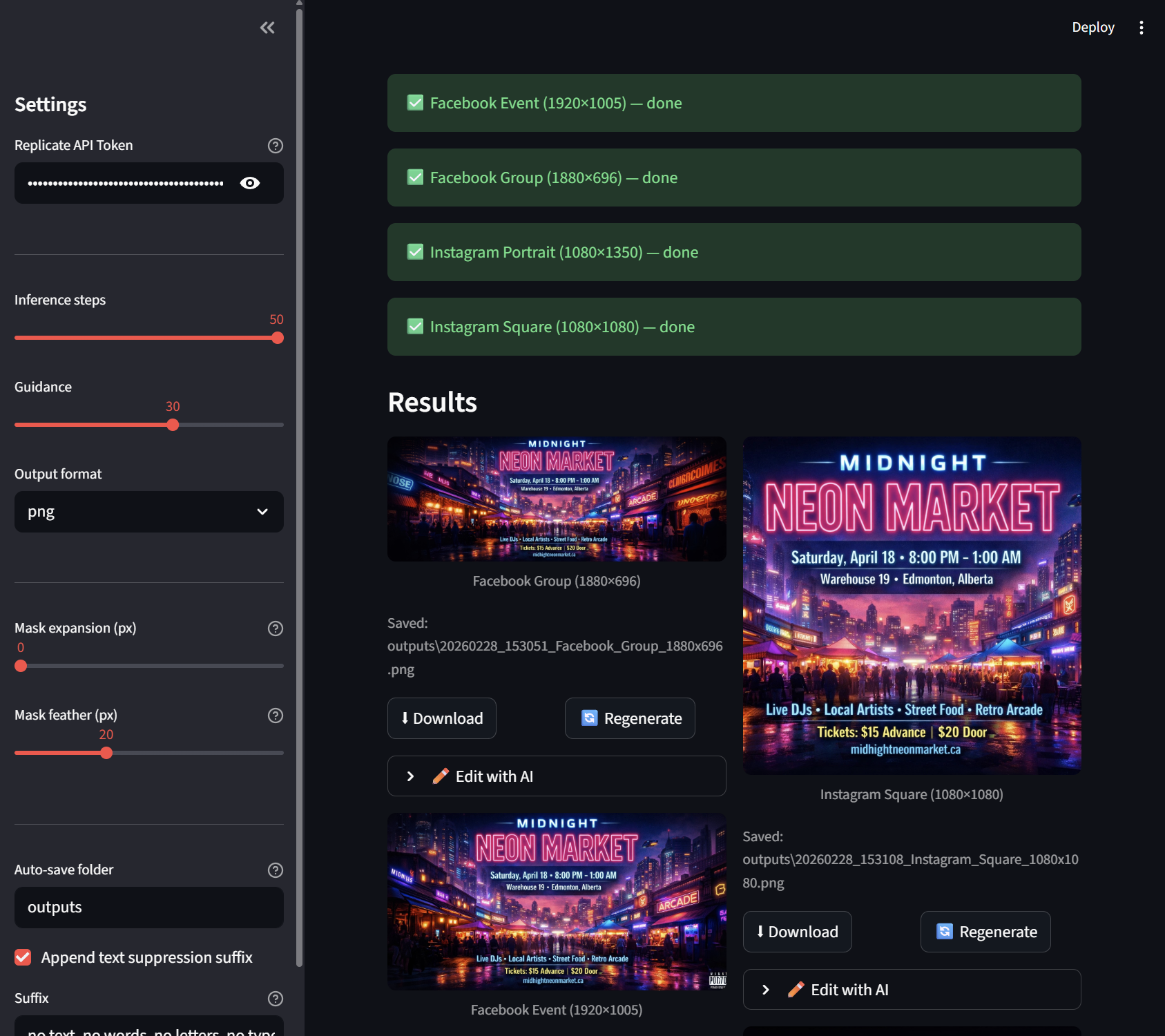
- Multiple target formats (Facebook Event 1920×1005, Facebook Group 1880×696, Instagram portrait 1080×1350, Instagram square 1080×1080).
- Protected area option: define a bounding box that the app will avoid scaling/cropping, useful for off‑centre subjects or logos.
- Preview canvas & mask shows exactly what the model will see before you generate — the white region is what gets painted by the AI.
- Mask controls for expansion and feathering so you can force the model to recreate edges or blend smoothly.
- Parallel generation: select multiple formats and they all run at once.
- Per‑result editing via Nano Banana Pro, Flux Kontext Pro/Dev if you need tweaks (e.g. remove text, darken background).
- Auto‑save: outputs are stored locally with timestamped filenames; the save folder is configurable in the sidebar.
- Text suppression: the app can append a suffix to the prompt like “no text, no words…” to avoid AI hallucinating characters.
How to try it
- Clone the repo and set up a Python virtualenv (3.10+).
- Install dependencies from
requirements.txt. - Copy
.env.exampleto.envand add your Replicate API token. - Run
streamlit run app.pyand open the local URL.
Once running you can upload any JPG/PNG/WEBP poster, optionally mark a protected region, tweak the prompt and mask settings, then hit Generate. The app displays each result with download, regenerate and edit buttons.
Notes & tips
- Use mask expansion (50‑100 px) when characters or objects touch the source edges; otherwise the model will try to continue them.
- Feathering (10‑30 px) avoids hard seams.
- The protected area lets you keep a logo/text centred when converting to wide banners.
- Regenerate just one format if the others look good — saves time and repaints only the problem result.
- After generation, open the Edit with AI panel to apply further instructions.
Under the hood
The repo is intentionally small:
1
2
3
4
5
6
outpaint_resizer/
├── app.py               # Streamlit UI
├── image_utils.py       # canvas/mask calculations
├── replicate_client.py  # wrappers for outpaint and edit_image calls
├── requirements.txt
└── outputs/             # auto‑saved results
image_utils.py handles all the math for scaling, padding, mask expansion/feathering, and rendering the preview. replicate_client.py wraps the Replicate API for the two models we use.
Get involved
Feel free to file issues or make a pull request if you have ideas — maybe more formats, a command‑line version, or support for paid models. I’ll happily accept improvements!
If you post about the app or use it for a project, drop me a line or open an issue so I can see what you’re building.
Happy outpainting! 🎨